 WhatsApp
 Facebook
 YouTube
JTTY on the ATS25: receiving the new WSJT-X text mode with GOLDENRADIO
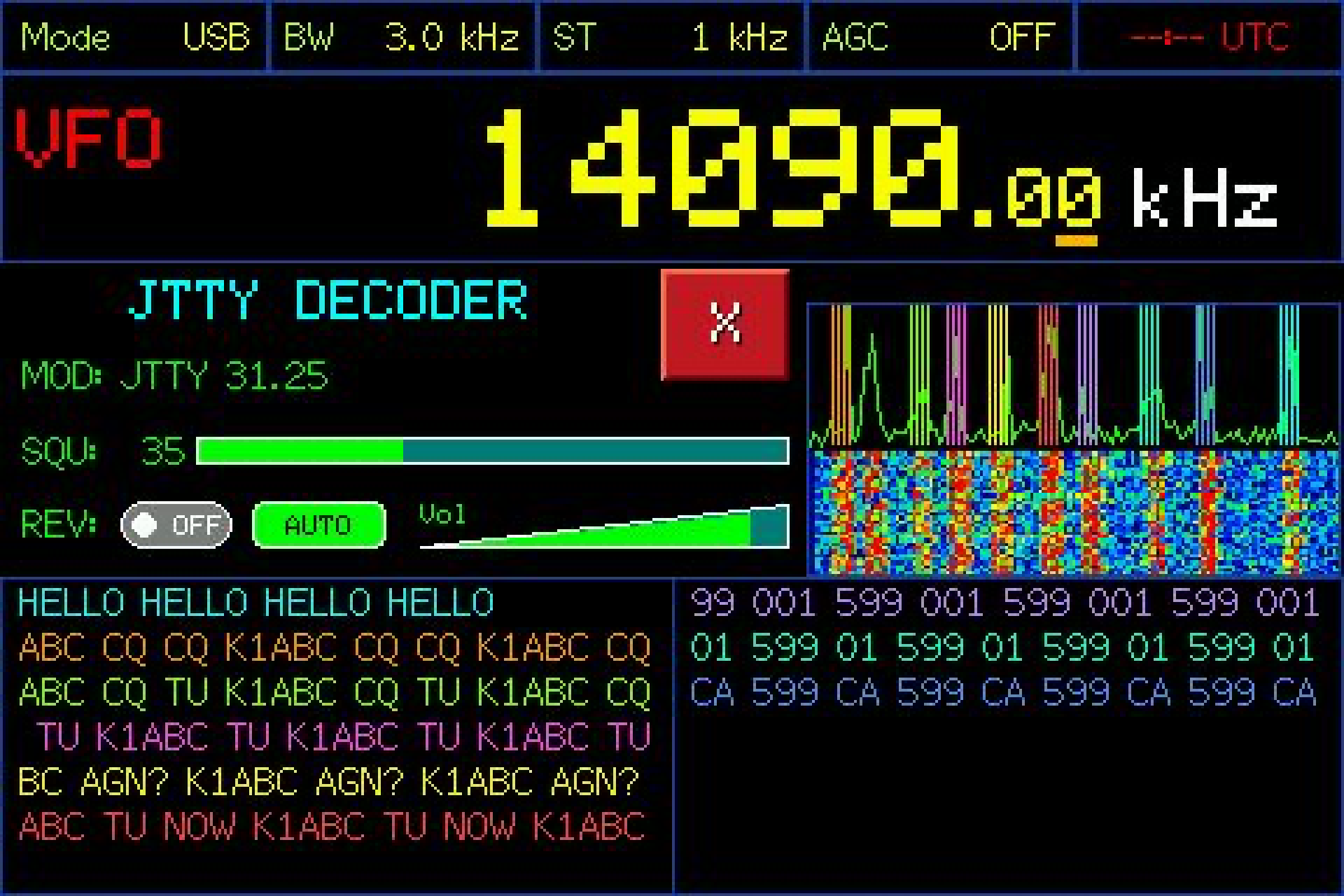
JTTY is a new text mode from the WSJT-X project, introduced with WSJT-X 3.2.0-rc1. GOLDENRADIO 2.2.9 adds a dedicated JTTY receive page, so you can read JTTY messages directly on the radio's screen, without a computer, WiFi or a synchronized clock — and follow more than one signal at the same time.
This article explains what JTTY is and how to set up the radio to receive it.
What JTTY is
JTTY sends short text messages as a sequence of frames. Each frame lasts 1.888 seconds and uses four audio tones spaced 31.25 Hz apart (4-GFSK at 31.25 baud): the lowest and highest tones are less than 100 Hz apart, so a JTTY signal is very narrow.
Every frame carries a small, strongly protected piece of the message: the data is checked by a 12-bit CRC and encoded with a convolutional code that corrects many reception errors. The last frame of a message is marked as the end of message (EOM).
A frame can carry several kinds of content, defined by the JTTY format: callsigns and call actions, free text from a 64-character alphabet, numbers and locations, grid locators, contest exchanges such as zone, class or section, serial numbers and times, and a set of standard control phrases.
Unlike FT8, JTTY does not use fixed time slots. Frames can start at any moment, so the receiver searches for them continuously.
What you need
- A radio model with the audio input used by the decoders: the JTTY button is available on the same models where the FT8 decoder works. On models without that input the button is disabled.
- GOLDENRADIO 2.2.9 or later, installed from the web installer.
- Nothing else: no WiFi, no UTC time synchronization and no computer are required.
How many signals you can follow at once depends on the model and on the memory available on the radio: up to ten simultaneous channels have been tested on the ATS25 Ultra.
Receiving JTTY step by step
- Tune the radio in USB to a frequency where there is JTTY activity. JTTY is new, so check the WSJT-X documentation and your community for the frequencies currently in use.
- Open the DIGI menu and press JTTY, to the right of FT8.
- Set an audio filter width that includes all four tones of the signal.
- The field F0 shows the audio frequency of the lowest tone (1500 Hz by default). On the spectrum, four colored markers show where the four tones should be.
- With AUTO off, the radio is in manual mode: you decide which signal to follow. Tap the spectrum on the lowest tone of that signal.
- If the signal uses the tones in reverse order, press REV.
- The squelch is 10 by default. If the signal is weak and nothing is decoded, lower it.
The JTTY settings are separate from those of the other digital modes, so changing one does not affect the others.
Receiving several signals with AUTO
The experimental AUTO mode searches for JTTY signals in the audio band by itself.
In manual mode, with AUTO off, you choose a single channel and follow only that one: its text fills the whole message area.
How messages appear
Each channel has its own row on the screen, starting with its audio frequency. Complete messages are added to the same row, separated by a space; when the row is full, the oldest characters scroll out to the left. The rows are arranged in two columns.
GOLDENRADIO does not print characters while it is still decoding. It collects the frames of a message and shows the text only when the end of message (EOM) arrives. A message can contain up to 80 characters in up to 16 frames.
If something interrupts a message — a gap in the audio, a reset, or a change of tuning or REV — that message is discarded and not shown. Changing the radio tuning or REV interrupts the partial messages of all active channels. The next complete message is received normally.
The JTTY format has no marker for the start of a message and no frame numbers. If you tune in while a transmission is already in progress, the first message you see may be missing its beginning.
A status indicator shows the state of the channels and signals each valid frame and each completed message. When the USB connection to a computer is enabled, received messages are also sent over USB, as with the other GOLDENRADIO decoders.
Tested against the official WSJT-X sample
The decoder follows the JTTY format published by the WSJT-X project. It is checked against the official JTTY audio sample from WSJT-X, which it must decode in full, exactly once, at two different sample rates:
RAN ALL NIGHT ON BAND NOISE - NO FALSE DECODES!
The same tests check that five minutes of pure noise produce no output, that two simultaneous signals are both decoded, and that resets, tuning changes and interruptions in the middle of a message never show a partial message.
Learn more
- JTTY design and frame structure, from the WSJT-X project.
- Official JTTY audio sample.
If you receive JTTY with your ATS25, tell us how it goes at support@golden-radio.com: reports from real stations help us improve the decoder.