 WhatsApp
 Facebook
 YouTube
Everything GOLDENRADIO can do
A high-performance alternative firmware that transforms your ATS25 series receiver into a powerful tool for SWL listeners, DX hunters, and radio amateurs.
Extended Hardware Compatibility
GOLDENRADIO supports the widest range of ESP32-based receivers on the market. Currently tested on:
Tested models use ILI9341, ST7789, ILI9488i or ILI9488 displays depending on the version. Support for the following models is in progress:
Why Choose GOLDENRADIO?
- ▸New Ultra-Fast FT2 Decoder: Decodes FT2, the new ultra-fast digital mode, with 3.8 second T/R cycles.
- ▸Superior FT8 Decoding: Analyze a full 3 kHz bandwidth and decode double the FT8 signals compared to standard firmware.
- ▸Instant Country Identification (DX Spotting): The only firmware on this platform that decodes the callsign prefix and shows the country of origin instantly. A first!
- ▸True Portability for Digital Modes: Thanks to manual synchronization, decode FT8 anywhere — outdoors and without Wi-Fi.
- ▸CW Decoder: Adaptive CW decoder with visual tuning, Goertzel filter, and scrolling messages.
- ▸RTTY Decoder: Visual tuning, multimode RTTY, and scrolling without interrupting live reception.
- ▸SSTV & WEFAX: Receive real images over the air — built for enthusiasts of these "visual" digital modes, from SSTV photos to WEFAX weather charts.
- ▸Visual Signal Hunting: Spectrum analyzer + waterfall let you see weak signals your ears might miss.
- ▸Large Decode History: Stores up to 300 FT8/FT2/FT4 messages, plus 60 lines each for CW and RTTY.
- ▸Professional Memory Management: 100 memories per band with save, rename, delete, and move.
- ▸Decoded Message Log: Send decoded messages to a PC over USB (FT2, FT4, FT8, CW, RTTY).
- ▸Modern UI: Smooth, responsive interface combining touchscreen + rotary encoder.
- ▸Stability & Optimization: Built for ESP32 + SI473x with maximum performance in mind.
Intelligent Band Navigation
A hierarchical menu system that takes you to the right band in a few logical touches.
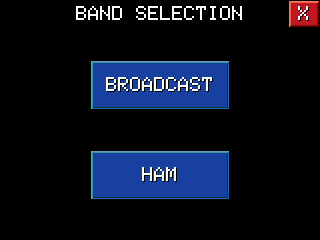
- ▸Main Choice: Broadcast stations or HAM communications.
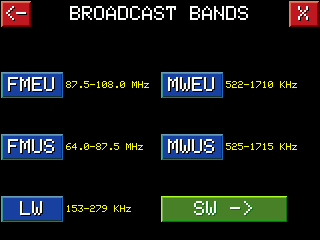
- ▸Broadcast: FM, MW, LW + a Shortwave (SW) submenu.
- ▸HAM: Full list of amateur bands from 160m to 10m.
- ▸Smart Menu Memory: The system remembers your last menu.
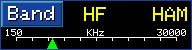
Each band includes its frequency range (e.g., "7000–7200 kHz"). For CB, GOLDENRADIO also shows the channel number.
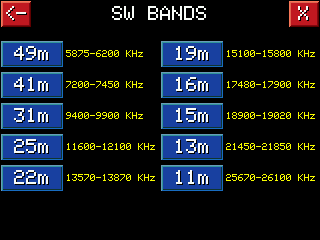
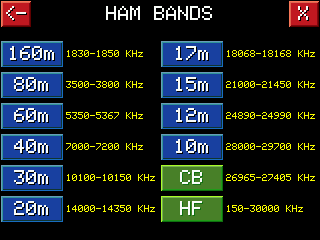
Complete Information Dashboard
Frequency Display
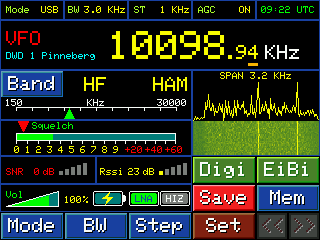
Large, clear frequency readout with VFO / MEM indication. In SSB (LSB/USB), resolution is 10 Hz for precise tuning.




Adaptive Spectrum Analyzer
- ▸HF (AM/SSB): Continuous spectrum + waterfall.
- ▸VHF (FM): Audio spectrum bars with peak hold.
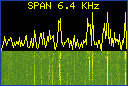
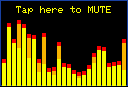
RDS Decoding & FM Indicators
On FM you get full RDS data (station name, PTY, Radiotext) plus a dedicated signal bar meter and STEREO indicator.
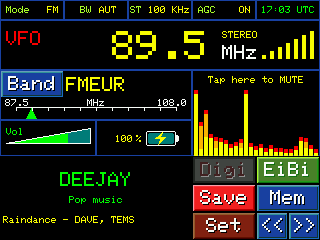
Signal & Band Indicators
- ▸Interactive Band Tuning: The band indicator is draggable. Touch and drag the triangle to jump anywhere inside the band — a unique feature.
- ▸Professional S-Meter & Squelch: Classic S-meter (S1–S9 with +20/+40/+60 dB) plus a draggable squelch indicator.
- ▸SNR & RSSI: Technical readouts for both signal quality and strength.
- ▸Status Indicators: Volume bar and battery icon with percentage — always visible.



Integrated Digital Modes
FT2 Ultra-Fast Decoder
- ▸3.8 s T/R cycle: Ultra-fast exchanges.
- ▸2.47 s messages: Real decoding in seconds.
FT4 Decoder
- ▸7.5 s T/R cycle: The fast middle ground between FT2 and FT8.
High-Performance FT8 Decoder
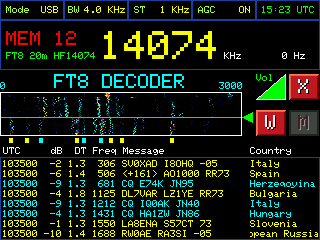
- ▸15 s T/R cycle: Robust, reliable exchanges.
- ▸Messages in 12.64 s: Full decoding with excellent weak-signal sensitivity.
FT2, FT4 and FT8 include:
- ▸Scrollable History: Review up to 300 messages while decoding continues.
- ▸Real-Time Country: When the locator is available, GoldenRadio shows country, distance and antenna bearing, decoded and shown instantly.
- ▸Auto-scrolling Long Names: Long country names scroll automatically.
- ▸CQ Highlighting: CQ calls shown in cyan.
Power & Flexibility
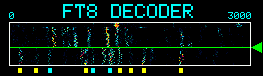
- ▸3 kHz Bandwidth: Double the decoding area compared to stock firmware.
- ▸Dual Synchronization: Automatic (Wi-Fi/NTP) for accuracy, or manual "Tap-to-Sync" for outdoor use without internet.
- ▸PC Integration (Serial Bridge): Send decoded messages over USB to logging software.
- ▸Professional Algorithms: Full FT8/FT2 stack including Costas, LDPC, message formatting.
CW Decoder (Morse)
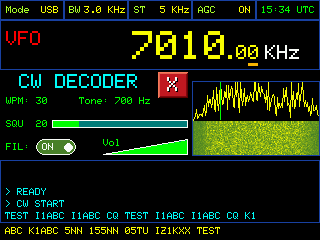
- ▸Visual Tuning Assist: Green line shows decode frequency; red indicator lights when locked.
- ▸Touch Spectral Tuning: Tap the spectrum peak to move the decode line instantly. Fine-tune with encoder in 5 Hz steps.
- ▸History + Scroll: Scroll messages without stopping the decoder.
- ▸Adaptive Filters: Optimized Goertzel extraction for noisy conditions.
- ▸Auto & Manual WPM: Automatic speed estimation plus manual control.
RTTY Decoder (Radioteletype)
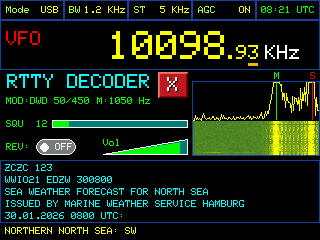
- ▸Visual Mark/Space Alignment: Green (Mark) and Red (Space) lines on the spectrum.
- ▸Touch Tuning: Tap to move the decode pair; fine-tune with encoder.
- ▸Message Review (Scroll): Scroll RTTY text without losing live data.
- ▸Multi-Standard Presets: HAM Standard (45 Baud, 170 Hz shift), HAM Low Tones, DWD Weather (50 Baud, 450 Hz shift).
Total Control Over Every Signal
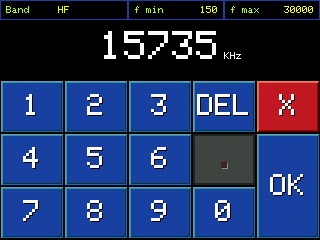
Direct Frequency Entry
Tap the display to open a numeric keypad and jump instantly to any frequency.
Fine Control: Mode, BW, Step
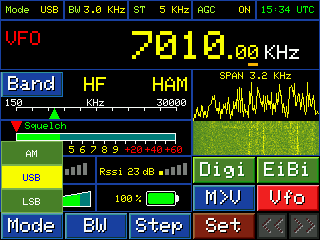
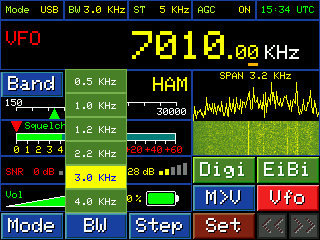
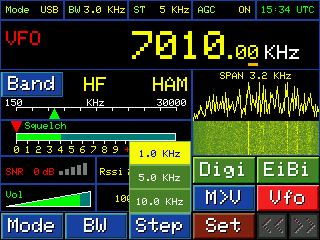
- ▸Mode: AM, FM, LSB, USB.
- ▸Precision Bandwidth Filters: Down to 0.5 kHz, up to 6.0 kHz.
- ▸Tuning Step: From wide band scan to fine 1 kHz centering.
Advanced Listener Features
- ▸Pro-Grade Gain Control: AGC or manual attenuation to manage QSB and strong-signal overload.
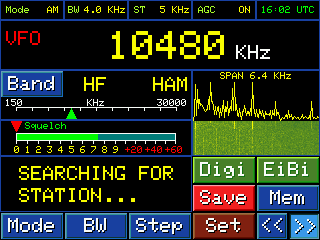
- ▸Smart Scan: Threshold tied to squelch. Start scan in either direction from touch buttons. Stop with a single encoder press or screen tap.
Integrated EiBi Database
GOLDENRADIO integrates EiBi, the world-famous frequency database.
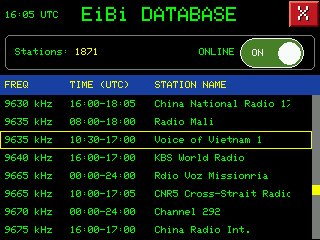
- ▸Instant Identification: See only stations active right now on that frequency.
- ▸Browse & Tune: Tap a station to tune instantly.
- ▸Smart Filters: Band Mode (current band), Global Mode (entire HF), ON AIR filter to hide inactive stations.
- ▸Web Update: Connect to the installation page and click "CARICA DATABASE EiBi".
- ▸Official Database: eibispace.de — the EiBi project homepage.
Settings & Personalization
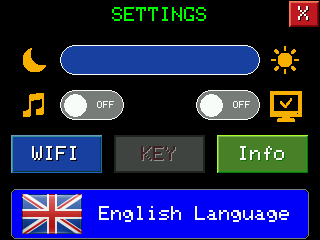
- ▸Display Brightness: Adjustable via slider.
- ▸Beeper: Enable/disable key feedback.
- ▸Serial Bridge: Send all decoded messages to USB for logging (FT2, FT8, CW, RTTY).
- ▸Multilanguage UI: Full interface translation.
- ▸Touch Calibration: Guided and fast.
- ▸QTH Locator: Set your Maidenhead locator to calculate distance and antenna bearing to the stations you receive.
- ▸Device Info: Model, firmware version, Product ID and license status on one screen.
Wi-Fi Management
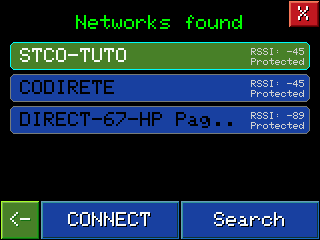
- ▸Scan and connect to networks with on-screen keyboard.
- ▸Auto-reconnect to the last saved network in FT8 mode.
- ▸Full management from the device (status, disconnect, delete).
Professional Memory Management
Save a station easily: tap Save and use the on-screen keyboard. In FM, GOLDENRADIO can capture the station name from RDS automatically.
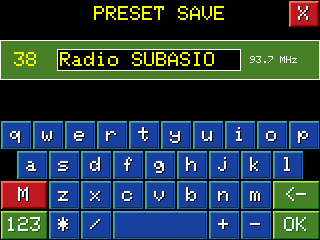
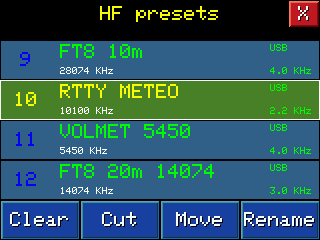
Access & manage memories instantly: press Mem in VFO mode, or tap the frequency display. Rename, delete, cut, move any preset with ease.
Trial Period & Permanent Activation
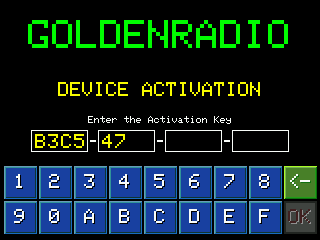
GOLDENRADIO offers a full-feature trial. At first boot, all features are available for a limited session time. When time ends, a reminder screen appears — but you can restart and continue using the full trial as long as you wish.
To remove the reminder screen permanently, activate your license:
Go to Settings > Info to read your Product ID.
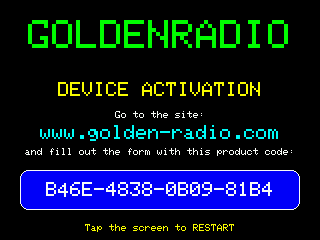
Enter your Program ID, pay once, receive your key by email.
Insert the key on the radio and confirm. GOLDENRADIO becomes permanently activated.