 WhatsApp
 Facebook
 YouTube
Calibration
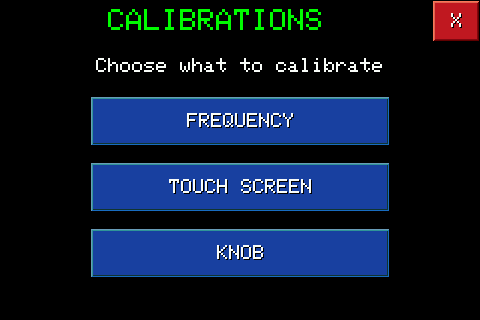
By pressing  on the Settings page you access the Calibrations page, from which you can choose the three available calibrations: Frequency, Touch Screen and Knob.
Frequency
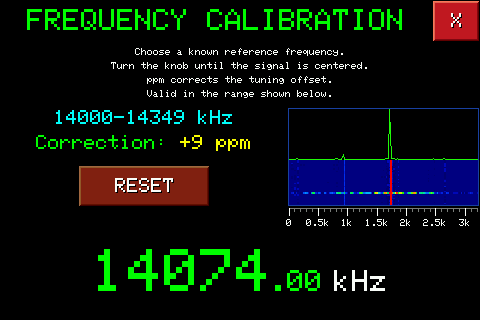
Corrects any deviation (offset) of the received frequency, measured in ppm. Tune in to a known reference frequency (for example a time standard like WWV, or a station whose exact frequency you are sure of) and turn the knob until the signal, visible in the mini spectrum on the right, is centred: the radio gradually applies the correction shown in ppm.
The correction is valid only in the frequency range shown above ppm (in the example 14000-14349 kHz): the radio automatically applies it every time you tune a frequency in that range, and maintains independent corrections for the other frequency zones. RESET resets the correction of the current zone.
It is not available on the AIR and VHF/2m bands.
Touch screen
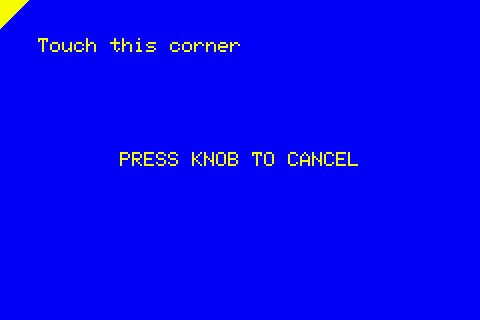
It recalls the same touch calibration seen when you first turned it on: you touch each indicated corner in sequence, and you can cancel it at any time by pressing the knob.
Knobs
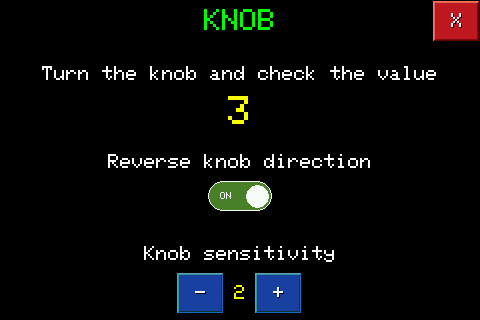
By turning the knob the value shown changes in real time: it is used to check that the knob responds correctly.
Reverse knob direction reverses the direction of rotation if the knob turns in the wrong direction than you expect.
Knob sensitivity, with the - and + buttons, adjusts how quickly the value changes with each click of the knob.