 WhatsApp
 Facebook
 YouTube
CW
The CW decoder page opens from the Digital Modes menu and decodes the telegraphy (Morse code) that the radio receives, displaying the text on the screen. The radio listens to a tone at a precise frequency, which can be set by the user, and transforms the sequences of dots and dashes into letters and numbers.
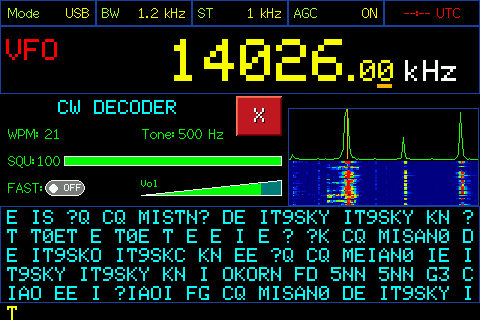
CW decoder page
Below is the description of the various components visible on the page.
Header
At the top are the same five boxes as the main page: Mode, BW, ST, AGC and the clock. In the example the radio is USB, with a 1.2 kHz band and 1 kHz step.
Frequency display
Below the heading is the frequency the radio is tuned to, in large letters, with VFO or MEM on the left. By touching the indication you switch from one mode to the other, as on the main page; when switching from MEM to VFO the radio remains on the same frequency.
Decoder title
Below the frequency, on the left, in blue, is the title CW DECODER. When you scroll, the decoded text becomes yellow with the word SCROLL, as we will see later.
WPM
WPM (words per minute) is the transmission speed of the signals you are receiving. The value ranges from 5 to 60. The decoder updates it by itself as it receives, and in that case the number is green; if you set it yourself, the number turns yellow while you change it.
Tone
Tone is the tone frequency, in Hz, that the decoder hears: it is the tone of the telegraph signal as you hear it in the speaker. In the example it is 500 Hz. The decoder only considers signals that are on that frequency, so it must coincide with that of the signal you want to decode.
Squelch (SQU)
SQU is the reception threshold, from 0 to 100: to the right of the label there is the numerical value and below a green bar that represents it. The decoder ignores signals weaker than the set threshold, so a higher value decodes only the strongest signals, a lower one makes the decoder more sensitive but also more exposed to noise.
FAST
FAST is a switch that regulates the speed of reaction of the decoder. With FAST turned off (OFF, as in the example) the decoder filters the signal more, and is more suitable for weak or noisy signals. With FAST turned ON it reacts faster, and is more suitable for strong and clean signals or for those who transmit quickly.
Volume
To the right of FAST is the volume control, labeled Vol.
X button
The red X closes the decoder and takes you back to the Digital Modes menu.
Spectrum and Waterfall
On the right is the spectrum of the received audio, with the waterfall (the color graph with time flowing downwards) underneath. A vertical line on the spectrum indicates the tone the decoder is listening to - the signal you want to decode must be on that line.
Decoded text
At the bottom is the text area, where the decoded letters and numbers appear in sequence. There are six visible lines; when more arrive, the text scrolls up. When the decoder does not recognize a character it writes a question mark ("?").
At each new session the first line is a header line, between equal signs, with the band and frequency: it serves to distinguish messages received at different times and on different frequencies.
Tune the tone
To decode, the tone must match that of the signal. Touch the spectrum: the box turns yellow and the word Tone turns yellow. From that moment you can change the tone in two ways: by turning the knob, in 5 Hz steps, or by touching the spectrum at the point where you see the signal (the line moves there). By touching any point outside the spectrum, the box turns blue again and the tone remains as set.
Changing speed (WPM)
Tap WPM: the number turns yellow. Rotating the knob changes the speed one value at a time, from 5 to 60. While you are changing it by hand the decoder does not update it itself; touching any point outside WPM makes the number green again and the decoder starts adapting it automatically again.
Adjust the squelch
Tap SQU: it turns yellow. By rotating the knob the threshold changes from 0 to 100. By touching any point outside SQU, the writing turns green. The chosen value is saved: the radio remembers it even after turning it off.
Changing reactivity (FAST)
Tap the FAST switch to turn it on or off. The choice is saved, so the radio remembers it even after it is turned off.
Change frequency
By turning the knob the frequency changes, in steps equal to the value of ST if you are in VFO, or by passing from one memory to another if you are in MEM. By touching the frequency digits, in VFO the numpad opens to directly enter the frequency; in MEM the list of memories opens, to choose one.
Scroll the text
Tap the text area: the title turns yellow with the word SCROLL and the text box turns yellow. By turning the knob you scroll back through the text already received (the radio retains 60 lines). To return to the incoming text, tap anywhere above the text area: the title turns blue and the text starts again from the last line.
Adjust the volume
Tap the volume control: it turns yellow. Rotating the knob raises or lowers the volume.