 WhatsApp
 Facebook
 YouTube
Band Selection
By pressing  on the main page you access the Band Selection page, from which you choose the operating band.
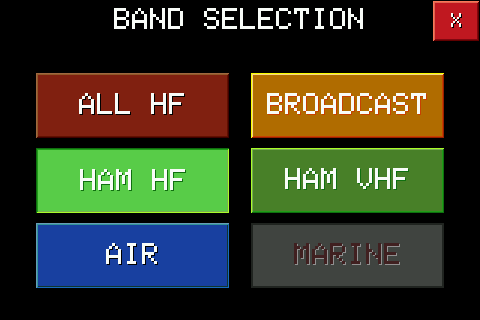
The MARINE button is visible but not yet active. The radio remembers the last selection page used: pressing Band again reopens that, not always the Band Selection.
Some buttons take you directly to the main page, immediately setting an entire range of frequencies: ALL HF (the entire HF band, free tuning) and AIR (aeronautical band, only on models that support it). Others, however, open a further selection page, with the individual bands: BROADCAST, HAM HF and HAM VHF (the latter only on models that support it).
HAM HF BANDS
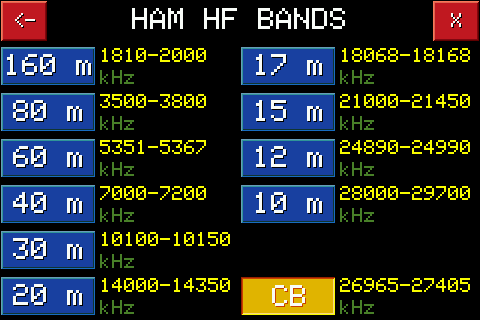
Lists the HF amateur radio bands (160m, 80m, 60m, 40m, 30m, 20m, 17m, 15m, 12m, 10m) plus the CB channel. By touching a band you immediately go to the main page tuned to that band.
HAM VHF BANDS
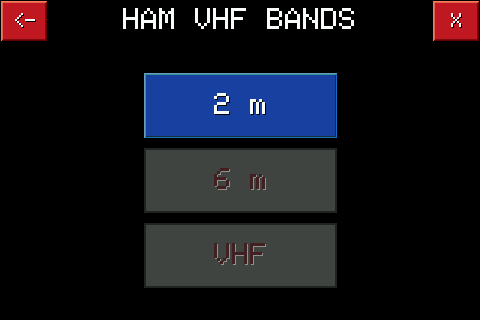
On models that support it, it lists the VHF amateur radio bands. At the moment only the 2 meter band is active; 6m and VHF are already visible but not yet available.
BROADCAST BANDS
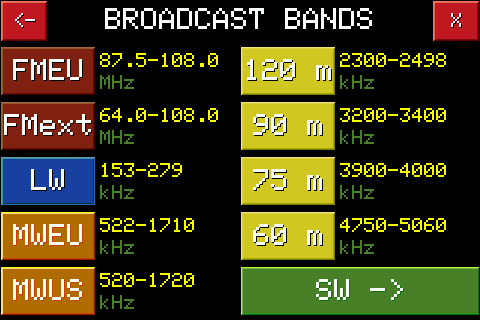
Lists broadcast bands: FMEU and FMext (FM), LW, MWEU and MWUS (medium wave), plus four SW bands (120m, 90m, 75m, 60m). The SW -> button at the bottom opens a further page with other SW bands.
SW BANDS
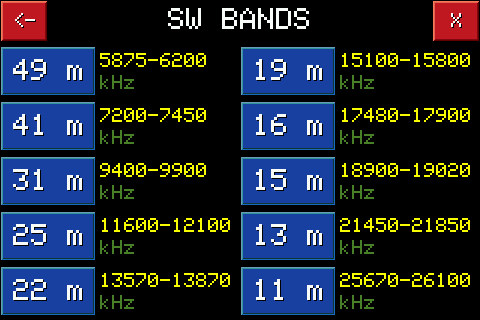
Lists other SW bands (49m, 41m, 31m, 25m, 22m, 19m, 16m, 15m, 13m, 11m). The arrow at the top left takes you back to the BROADCAST BANDS page.