 WhatsApp
 Facebook
 YouTube
Main page
GOLDENRADIO features two types of main page: one for the FM broadcast bands, and one for all the other bands (HF, AIR and VHF), which share the same layout.
When first started, GOLDENRADIO starts with the FMEU band.
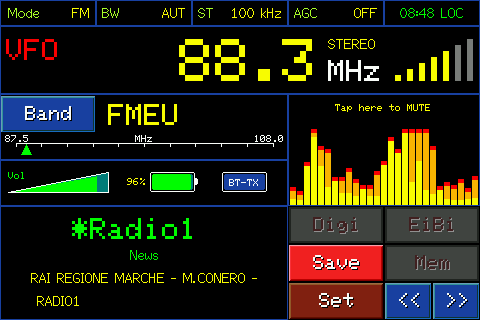
Main page on FM band
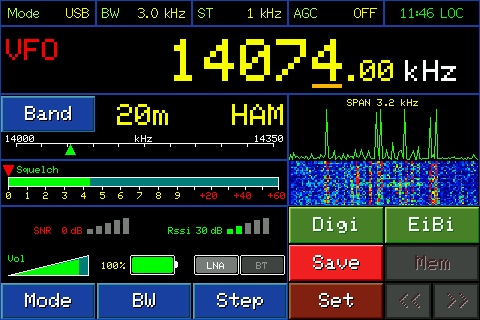
Main page in HF band
Below is the description of the various components visible on the two pages.
Status bar

The first four labels show the current receive settings: Mode (modulation), BW (bandwidth), ST (tuning step, in kHz), and AGC (automatic gain control). In FM these values are fixed, not modifiable from here; on the other bands, however, they reflect the choices made with the Mode/BW/Step buttons further down, which we will see shortly.
The fifth, furthest to the right, is the clock. As long as the radio has never synchronized the time (e.g. no WiFi network available) it shows "--:-- UTC" in red. After synchronization it shows the time: in green if WiFi is connected at that moment, in red if it is synchronized but WiFi is not currently connected. Tapping the clock switches between UTC time and local time (LOC) and vice versa — local time, however, requires you to set your time zone.
VFO mode and MEM mode
The radio can work in two modes, VFO and MEM: which of the two is active can be seen at the top left in the frequency display, which we describe below.
VFO (acronym for Variable Frequency Oscillator) is free tuning: by turning the knob the frequency changes in small steps (those chosen with Step) and you can go wherever you want within the band. The display shows VFO.
MEM is memory mode: the radio is tuned to a station that you have previously saved. The display shows MEM followed by the memory number and name. By turning the knob you don't change frequency in small steps, but you go from one saved memory to another.
Frequency display

VFO/MEM indicates whether you are listening to the VFO (free tuning) or to a memory (MEM, followed by the memory number).
Immediately below appears, depending on the case: the name of the memory (if in MEM and you have given it one) or of the recognized EiBi station (if in VFO and the frequency corresponds to an entry in the EiBi database); then the actual frequency, in large.
In FM, to the right of the frequency there is also the STEREO indicator (it only appears when the station actually broadcasts in stereo) and the signal bars, always present.
In the CB band, when the frequency coincides with one of the CB channels, the number of the corresponding channel also appears next to it.
Band Range panel
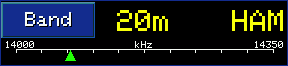
The box labeled "Band" shows the current band (e.g. "20m HAM" on HF, "FMEU" on FM) and the range covered, with a small green triangle indicating where you are in that range. Touching the word "Band" opens the band selection.
In VFO mode, by touching the bar with the green triangle you quickly move to that point in the band: the frequency jumps immediately to the point touched.
Volume

The green bar at the bottom left shows the volume level in percentage. To change it, tap it — it turns yellow — and turn the knob.
Drums

Next to the volume, the percentage of charge; on some models the lightning icon also appears when the radio is connected to power/charging.
LNA and BT

To check on the radio: if your model really shows HIZ instead of BT in that position (from the code, on the ULTRA models used for the screenshots of this manual HIZ never appears: the second button is always BT, even if Bluetooth is not available on that model).
On the HF, AIR and VHF bands (not in FM) two switches appear, independent of each other. LNA (Low Noise Amplifier) amplifies the incoming signal: useful with weak signals or short antennas, although it can make things worse with already strong signals or in crowded bands. The second button, on ULTRA models, is BT: it opens the Bluetooth functions of the radio, described in full in the Bluetooth chapter (on other models, in its place, HIZ may appear instead, which switches to a high impedance antenna input).
In FM, LNA and this second button do not appear in this row: here however, on the ULTRA models, a dedicated BT button next to volume and battery — same function, different location.
Spectrum and Waterfall
In FM there is only the spectrum: a mini audio spectrum (calculated via FFT) to the right of the frequency, with colored bars and a peak marker (max-hold). Above it says "Tap here to MUTE".
In the FM band, touching the spectrum mutes the audio (the word "MUTE" appears in the center); touching it again releases mute and becomes audible again.
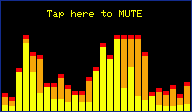
Spectrum, in FM
On the other bands (HF/AIR/VHF) there is instead the spectrum of the radio signal accompanied by the waterfall, which shows how it changes over time.
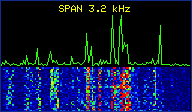
Spectrum and waterfall, in HF
Squelch

Present only on HF/AIR/VHF bands, not on FM. The bar shows the signal level; the red triangle indicates the set squelch threshold — below that threshold the audio remains muted. You adjust the threshold by touching the bar: the little triangle immediately moves to the touched point.
SNR and RSSI indicators

Present only on HF/AIR/VHF bands, not on FM. SNR is the signal-to-noise ratio, RSSI is the received signal strength — both in dB, with a level bar next to it. Indicators only, do not touch.
RDS panel
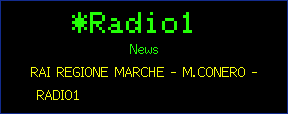
When the station transmits RDS data, three different pieces of information appear in sequence at the bottom left: the station, i.e. the name that the broadcaster sends to identify itself (e.g. "DEEJAY"); the genre, i.e. the category of the program being broadcast (e.g. "Pop music"); and the radiotext, the two-line free text that the station sends and which constantly changes — song title, host's name, advertisement, and so on.
Mode, BW and Step buttons


Present only on HF/AIR/VHF bands, not on FM. Each opens a drop-down menu: Mode to choose the modulation (in the HAM bands: LSB/USB/AM; in the broadcast bands it is fixed), BW for the filter width, Step for the tuning step. They touch each other again to close the curtain without choosing.
Digi button

Opens the digital decoder menu (FT8, RTTY, CW...). In FM it is deactivated, because those decoders only work in short waves.
EiBi button

Opens the EiBi list of shortwave broadcast stations. Active only on HF bands: deactivated not only on FM but also on AIR and VHF.
Save / M>V button


It's a button that changes based on where you are. In VFO it shows "Save" and opens the page to save the current station in a new memory. In MEM it instead shows "M>V" (Memory->VFO) and copies the frequency and mode of the memory you are listening to inside the VFO.
Mem / Vfo button


It's a button: it shows "Mem" when you're in VFO (pressing it puts you in MEM mode, the top left label becomes "MEM" followed by the memory number and name, as seen above), and it shows "Vfo" when you're already in MEM (pressing it puts you back in VFO, on free tuning).
Set button

Opens the Settings page.
Search buttons
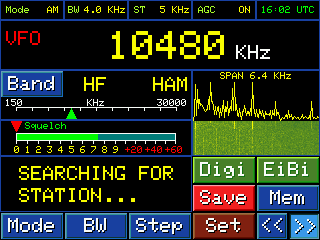
They start an automatic search forward or backward with respect to the current frequency: the radio scrolls the band on its own and stops as soon as it finds a strong enough signal. If it doesn't find it and reaches one end of the band, it starts again at the other end. To stop it before it finds anything, press the dial.
They only work in VFO mode, not in MEM, and only on AM and FM modulations: in LSB and USB these buttons remain deactivated.