 WhatsApp
 Facebook
 YouTube
Numeric Keypad
The numeric keypad allows you to tune a precise frequency by typing it, instead of reaching it in small steps with the knob. It opens by touching the frequency digits while in VFO mode (see VFO mode and MEM mode): from the main page, or from the decoder pages that show the frequency (FT2, FT4, FT8, CW, RTTY, PSK and NAVTEX). In MEM mode, the same touch opens the list of memories, to choose one (see Recall memories).
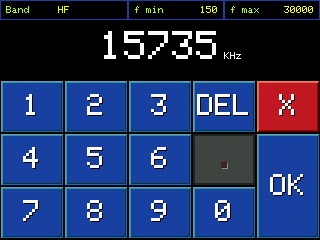
Numeric keypad, in HF band, with "15735" already entered
Below is the description of the various components visible on the page.
Band, f min and f max boxes
At the top, three read-only boxes: Band shows the name of the band you are on (e.g. "HF"), f min and f max its range of valid frequencies. They serve as a reference: what you type must fall within this range.
Typing frequency
In the center, in large size, the frequency you are typing appears, in green, with the unit of measurement (kHz or MHz) next to it. As long as you haven't typed anything it shows the current frequency.
Numeric keys
The digits from 0 to 9, to dial the frequency.
Decimal point
In most bands (medium wave, short wave, amateur radio) the frequency is in kHz and is always an integer: here the dot remains deactivated, darker. On the VHF (FM), AIR and 2 meter broadcast bands, where the frequency is in MHz, the dot is active and is used to enter decimals.
DEL
Deletes the last digit entered (or the period, if it is the last character entered).
OK
Confirm the entered frequency.
X
Cancel and exit the keypad without changing anything.
Type a frequency
Tap the digits in order: they gradually appear in the center of the screen, in green. You can't start with a 0. If you make a mistake, DEL erases the last character you typed, one tap at a time.
Confirm with OK
GOLDENRADIO verifies that the frequency entered is within the range of the current band (the one shown in f min/f max). If it fits, round the value to the closest tuning step among those available for that band - which can therefore change on its own, together with the ST indication that shows it - and tune the radio, returning to the page from which you opened the keypad.
If the value you type is outside the allowed range, the frequency appears in red with "Error" underneath, the keypad resets and you can type again.
Cancel with X
Returns to the page from which you opened the keypad — the main page, or the decoder — without changing the radio frequency.