 WhatsApp
 Facebook
 YouTube
SSTV
The SSTV decoder page opens from the Digital Modes menu and receives images broadcast in SSTV (Slow Scan Television): an image is transformed into a sound that lasts from a few seconds to several minutes, and the radio listens to it and redraws the image on the screen, line by line, as it arrives.
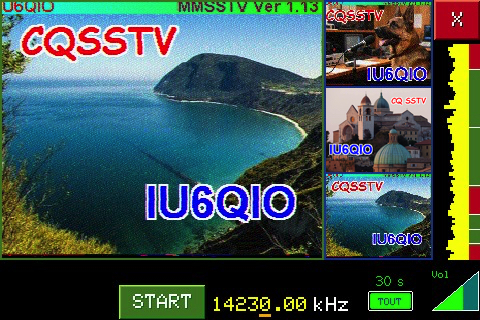
SSTV decoder page, with a received image and the three thumbnails of the latest images
Below is the description of the various components visible on the page. Unlike the other decoder pages, here there is no header with Mode, BW, ST and AGC nor the waterfall: the entire screen is dedicated to the image.
Image area
It is the large box at the top left, where the received image is drawn. When you enter the page, before starting reception, it contains the words SSTV DECODER and the indications "Press START to decode" and "The mode is detected automatically".
The color of the frame tells you what the decoder is doing: green when it is stopped, red when it is listening or receiving an image.
Miniatures
To the right of the image area there are three boxes with blue frames, which contain thumbnails of the last three images received. When a new image begins, the next box shows the mode name and the word WAIT… with a yellow frame; once the image is finished, the frame turns blue again and the thumbnail remains in the frame. After the third panel we start again from the first, replacing the oldest miniature.
X button
The red X, at the top right, closes the decoder and takes you back to the Digital Modes menu. While listening and reception is deactivated: to exit you must first stop reception with STOP.
Tuning meter
It is the vertical column on the right, under the X. It shows the spectrum of the sound coming from the radio: the highest frequencies are at the top, the lowest ones at the bottom. Next to it there is a colored strip and some white lines that mark 2300, 1900, 1500, 1300, 1200 and 1100 Hz: the green areas are those where the tones of an SSTV signal are found (the synchronism pulses between 1100 and 1300 Hz, the image between 1500 and 2300 Hz), the red ones are outside. It helps to understand if you are tuned in well to the signal: the peaks must fall in the green areas.
The meter only moves when the decoder is stationary, i.e. while it is tuning; after START it stops.
START / STOP
The green button at the bottom left starts listening. Once started it turns red with the word STOP; touching it stops everything and the page returns to the way it was before pressing START.
State
Below the image area, to the left of the START button, the status of the decoder appears: "WAIT" in yellow while the radio listens for an SSTV signal, and the name of the recognized mode, in green, as soon as the radio detects one (for example "Scottie1" or "PD-120").
Frequency
To the right of START is the frequency the radio is tuned to, in yellow, with the word kHz. In SSB the frequency is shown in hundredths of kHz (14230.00 in the example) and under one of the three final digits there is an orange line: it indicates the digit that the knob modifies, i.e. the tuning step.
TOUT
The green TOUT button, at the bottom right, opens the choice of maximum waiting time (TOUT stands for timeout). The current value is written above the button: "30 s" in the example, "15 s" if it has never been changed.
Volume
At the bottom right, next to the frequency, there is the volume control, with the writing Vol.
Receive an image
First tune the radio to the frequency where SSTV is broadcast, and adjust the tuning by looking at the meter. Then touch START: the frame turns red, the button becomes STOP and "WAIT" appears.
You don't have to choose the mode: the radio recognizes it on its own from the signal (it measures how often the synchronism pulses of the lines arrive, and compares them with those of the supported modes). When he finds it, his name appears in place of HOLD, the radio beeps, and the picture begins to be drawn, line by line. Reception stops on its own once the image is complete, with another beep; at this point the image remains on the screen, the radio immediately returns to listening for the next one and there is no need to touch START again.
Until it recognizes a new signal, the radio does not touch the image area: the last image received remains visible.
Supported modes
The decoder recognizes and decodes these SSTV modes:
- Scottie 1, Scottie 2, Scottie DX
- Martin 1, Martin 2
- Robot 24, Robot 36, Robot 72
- BW 8, BW 12 (black and white)
- PD 50, PD 90, PD 120, PD 160, PD 180, PD 240, PD 290
Stopping reception (STOP)
While listening or receiving an image, tap STOP: reception stops, the frame turns green again, and frequency, volume, meter, TOUT and X become usable again.
Change frequency
With the decoder stopped, turning the knob changes the frequency in steps equal to the value of the figure underlined by the orange line. By pressing the knob the dash moves to the next digit, cyclically. If you are in MEM, the knob scrolls through the memories. While listening and receiving, the frequency is blocked: to change it, first touch STOP.
Changing the waiting time (TOUT)
Tap TOUT: the "SSTV TIMEOUT" page opens, with the text "Select the maximum time after which waiting with poor signal is stopped" and six buttons: 2 s, 5 s, 15 s, 30 s, 1 min and 3 min. Tap what you want: the choice is saved (the radio remembers it even after turning it off) and you return to the decoder. A short time causes images with a weak signal to be immediately abandoned; a long time gives more chance of recovering a disturbed image. Tapping the X at the top right takes you back to the decoder without changing anything.
Adjust the volume
With the decoder stopped, tap the volume control: it turns yellow. Rotating the knob raises or lowers the volume. During listening and reception the control is off (grey) and cannot be changed.