 WhatsApp
 Facebook
 YouTube
QTH Locator
Pressing  on the Settings page takes you to the QTH Locator page, to set your Maidenhead locator.
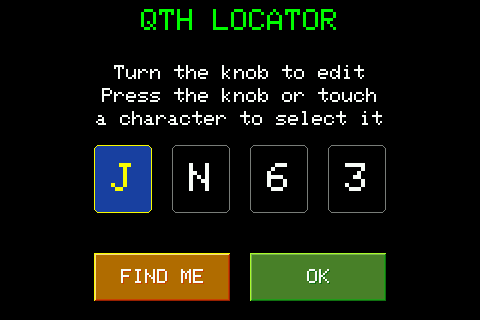
The locator is made up of four characters: the first two letters (A-R) and the last two digits (0-9), each shown in its own box. The selected box has a blue background.
Rotate the knob to change the character of the selected box; press the knob, or directly touch another box, to change that one.
The FIND ME button (available only with WiFi connected) tries to automatically detect the locator based on the location of the connection: during the search it shows Searching..., then fills in the four boxes or shows an error if it fails. The result is a rough estimate (based on the IP, not on a GPS): a yellow warning indicates this under the boxes, and it is however possible to correct it manually with the knob before confirming.
OK saves the locator set and returns to the Settings page.
The locator set here is your reference point on the locator map of the FT8, FT4 and FT2 decoders: the radio uses it to position your dot on the map and to calculate distance and direction (bearing) towards each decoded station, shown both in the message list and on the map itself.