 WhatsApp
 Facebook
 YouTube
JTTY
JTTY is a digital radio mode for receiving text messages. GOLDENRADIO decodes it directly in the radio, without requiring a computer. Open it from the Digital Modes menu. The page offers AUTO, which searches for multiple signals across the audio band, and MAN, for following one quartet chosen by the operator.
JTTY uses four closely spaced audio tones, 31.25 Hz apart. F0, shown on the spectrum, is the lowest tone of a quartet; it is not the RF frequency displayed at the top of the page.
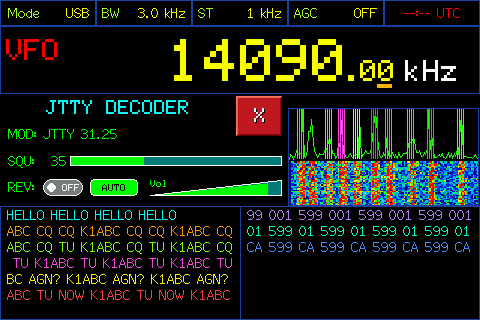
JTTY in AUTO: each channel keeps its own colour and message row.
Frequency and band presets
The large frequency display shows the radio's RF frequency. Band buttons select the JTTY presets; PRESET means a standard frequency is selected. To use another frequency, choose VFO and enter it with the numeric keypad. An entered frequency is recognized as a preset only if it matches exactly; otherwise VFO remains selected. The RF frequency can also be tuned with the knob, using the small dashes below the digits to choose which digit to adjust.
JTTY presets: 160 m 1,838 kHz; 80 m 3,580 kHz; 60 m 5,357 kHz; 40 m 7,090 kHz; 30 m 10,140 kHz; 20 m 14,090 kHz; 17 m 18,100 kHz; 15 m 21,090 kHz; 12 m 24,920 kHz; 10 m 28,090 kHz.
Spectrum and quartets
The spectrum shows received audio. A quartet consists of four nearby bars; all four bars share one colour and identify a JTTY channel. Different channels use different colours, also used for their corresponding message rows. S means that the decoder has synchronized to the signal; L marks a locked channel.
AUTO: search for multiple signals
With AUTO enabled, GOLDENRADIO continuously scans the audio band for quartets, so you do not need to select their audio frequencies in advance. It can follow up to ten channels at once. Signals may start and end at different times, and their F0 frequencies need not be evenly spaced: each channel is synchronized and decoded independently.
Messages stay in their channel's column; on large displays they are arranged in two panels, five channels per column. Rows scroll automatically as new messages arrive; you do not need to touch the list. When a signal remains inactive, its slot is eventually released and AUTO resumes searching.
Touch a quartet to add or remove L. A locked channel keeps its frequency and slot even when its signal pauses, while the other channels continue searching. Touch it again to unlock it and return the slot to the scan.
MAN: follow one signal
With AUTO disabled, the decoder follows one quartet. Touch the point on the spectrum where you want it to search; you can also choose an area with no visible bars. GOLDENRADIO searches nearby, adjusts F0 and synchronizes to the signal. This does not retune the radio's RF frequency. You can move the search point and fine-tune the selection with the knob.
Before synchronization, the selected quartet is yellow. Once synchronized it turns cyan and a green S appears above it. If you move the selection, S disappears while the decoder searches again, then returns when it synchronizes. In MAN, messages use a full-width area, wrap onto new lines and remain in a scrollable history. Touch the text area and turn the knob to browse earlier text; touch outside it to return to the latest messages.
SQU, REV and volume
SQU adjusts the decoder squelch. Raise it if noise causes unwanted attempts; lower it if weak signals are not being acquired. REV reverses the tone order and is only needed when a received signal has the opposite polarity. Vol controls the radio audio level; it does not change decoding.