 WhatsApp
 Facebook
 YouTube
Settings page
By pressing  on the main page you access the Settings page, from which you configure the screen, sounds, connections and the various functions of the radio.
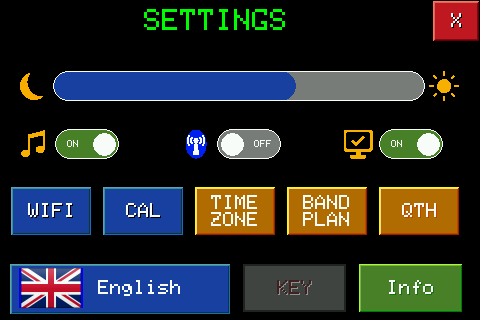
Brightness

Adjust the screen brightness. Touch a point on the bar to set that level directly; touching the bezel on the left goes to minimum, touching the sun on the right to maximum.
Beeper

Activates or deactivates the acoustic signal (beep) that the radio emits whenever you touch and press buttons.
Bluetooth

Turn the radio's Bluetooth on or off.
PC connection

Activates or deactivates the sending via USB serial of messages decoded by digital modes (FT8, FT4, FT2...), useful for keeping a log on the connected computer.
Shortcut buttons
The eight buttons under the two switches call up other pages, each dedicated to a function: WiFi (networks and connection), CAL (calibrations), Time Zone (time zone), Band Plan (IARU region), QTH (Maidenhead locator).

And then: the current language (touch to change it), KEY (activation/license) and Info (firmware information).
