 WhatsApp
 Facebook
 YouTube
WEFAX
The WEFAX decoder page opens from the Digital Modes menu and receives meteorological faxes (weather maps, satellite images) transmitted via radio: the radio listens to the signal and draws the image on the screen, in black and white, line after line, as it arrives. WEFAX transmissions follow precise rules (start, synchronization, image, end) and the page can follow them on its own, or leave the choice of parameters up to you.
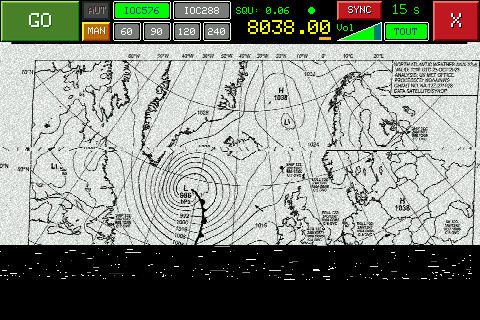
WEFAX decoder page, in MAN SYNC mode, after receiving a weather map
Below is the description of the various components visible on the page. As in the SSTV decoder, there is no header with Mode, BW, ST and AGC nor the waterfall: the commands are all in the top band, and below is the area where the image is drawn.
GO / STOP
The large green button at the top left starts reception. Once started it turns red with the word STOP; touching it stops reception. If you are in manual mode, until you have chosen the required parameters the button is gray and does not respond (see below).
AUT / MAN
Immediately to the right of GO there are two small buttons, one above the other, which choose the operating mode: AUT (automatic) and MAN (manual). The active one is colored, the other is gray. They can only be changed when reception is stopped; with each change the choices made manually are reset.
Central box
In the center of the top band there is a box that changes depending on the mode. In AUT it shows the spectrum of the received audio, from approximately 400 to 2700 Hz (the peaks are yellow bars), with four orange lines with the letters 576, 288, B and W: these are the points where the transmission start tones appear for IOC 576 and for IOC 288, and the black (B) and white (W) tones of the image. In MAN it instead shows the buttons to choose the parameters: at the top IOC576 and IOC288, below 60, 90, 120 and 240 (the LPM, see below).
Squelch (SQU)
To the right of the central box is SQU, the reception threshold, with the value from 0.00 to 1.00. The dot to the right of the value indicates whether the arriving signal exceeds the threshold: green yes, red no.
Frequency
Below SQU, in yellow, is the frequency the radio is tuned to, with hundredths of a kHz in SSB. Under one of the three final digits there is an orange dash, which indicates the digit modified by the knob (the tuning step).
FREE / SYNC
At the top right, above the volume, there is a small button that in MAN chooses between two modes: FREE (blue) and SYNC (red). The writing indicates the active mode. In AUT it is gray and cannot be touched. It is only changed when reception is stopped; see what changes later.
Volume
Below FREE/SYNC is the volume control, labeled Vol.
TOUT
The TOUT button, to the right of the volume, opens the choice of maximum waiting time (TOUT stands for timeout). The current value is written above the button, "15 s" in the example. It is active (green) in AUT, when reception is stopped, and in MAN SYNC; in MAN FREE it is grey.
X button
The red X, at the top right, closes the decoder and takes you back to the Digital Modes menu. It is deactivated during reception: you must first touch STOP.
Image area
The entire part of the screen below the control panel is the area where the image is drawn, as wide as the screen. Before reception it contains the writing WEFAX DECODER and a reminder: "AUT: automatic detection", "MAN FREE: choose IOC + LPM", "MAN SYNC: choose IOC, LPM from phasing", and below, for the reception in progress: "Knob: SLANT / PHASE", "SLANT: tilt", "PHASE: horizontal position".
The three ways of reception
In WEFAX, IOC and LPM are the two parameters that describe the transmission: the IOC (cooperation index, 576 or 288) determines the width of the image, the LPM (lines per minute: 60, 90, 120 or 240) the speed with which the lines are transmitted. The decoder can receive in three ways:
- AUT — the radio does everything by itself: it waits for the start tone, from which it recognizes the IOC, then the synchronization phase, from which it obtains the LPM, and finally it draws the image. You don't have to choose anything.
- MAN FREE — you choose IOC and LPM, and the radio starts drawing immediately when you touch GO, without waiting for any signal. There is no automatic recognition and reception does not stop on its own: you have to touch STOP.
- MAN SYNC — choose IOC only; The radio obtains the LPMs from the phasing phase of the transmission. When the broadcast ends, the radio goes back to waiting for the next one.
💡 Quick-start tip
If you are expecting an IOC 576 transmission, try this: tune to the correct frequency (which you need to know), select MAN, then SYNC and IOC576, and tap GO. In SYNC, the radio waits for the phasing signal sent at the beginning of the transmission; when it detects it, it starts a synchronized, centered image. AUT may not select the IOC if it cannot detect the station's start tone. FREE is still an option: after GO, it starts drawing immediately, even if the transmission is already underway, so the image may begin partway through and may not be centered.
Receive in AUT
Tune the radio, choose AUT (if it isn't already) and tap GO: the button becomes STOP. The radio listens waiting for the start tone: in the central box the spectrum shows the signal. When the tone has been recognized for one second the radio emits a beep, and the central box shows the identified IOC, highlighted. Then the radio synchronizes on the phasing phase, obtains the LPMs (now also highlighted), erases the image area with another beep and begins to draw the image.
During reception, the frequency and volume become gray and cannot be changed. Reception ends when the end of transmission tone arrives, or when a valid signal no longer arrives for the time chosen in TOUT: the radio then returns to waiting for a new transmission, and the image remains on the screen until another one begins.
Receive in MAN FREE
Tap MAN, then FREE if the button shows SYNC. Choose the IOC and LPM by tapping the buttons in the central pane (the chosen one is highlighted). Until you have chosen both, GO is gray. Touch GO: the radio immediately begins to draw, from here to pressing STOP.
Receive in MAN SYNC
Tap MAN, then SYNC if the button shows FREE. Just choose the IOC; for the LPMs there is nothing to choose (if you touch one of the LPM buttons you return to FREE). Tap GO: the radio waits for the phasing signal, obtains the LPMs, and begins drawing. At the end of the transmission (end tone, or no signal for the time chosen in TOUT) it emits a beep and returns to waiting for the next phasing.
During reception: inclination and position
If the image appears skewed, or shifted horizontally, you can correct it as it arrives. At the top, instead of SQU, SLANT (tilt) appears with a value: by rotating the knob the value changes in steps of 0.01 and the inclination of the image changes accordingly. By pressing the knob you move to PHASE (horizontal position): by rotating it the image scrolls sideways, in a circle (a dot that comes out from one side comes back from the other). Pressing again switches to SQU, and again to SLANT: SLANT, PHASE and SQU alternate with each press. The selected value is in yellow.
To reset the selected value, touch the SLANT / PHASE area at the top: SLANT returns to 0, PHASE returns to 0. The slope correction is saved for each combination of IOC and LPM, and reused at the next reception.
Stopping reception (STOP)
Tap STOP to stop receiving at any time. The radio stops listening, the button returns to GO, and frequency, volume, AUT/MAN, FREE/SYNC, TOUT and The image remains on the screen.
Change frequency
By rotating the knob, in SSB, the frequency changes in steps equal to the value of the figure underlined by the orange line. By pressing the knob the dash moves to the next digit, cyclically. The tuning can also be changed while the radio is waiting for the signal (after GO, before it starts drawing); during drawing no. In AUT look at the spectrum in the central box: the peaks must fall on the orange lines.
Adjust the squelch
Tap SQU: the value turns yellow. By rotating the knob the threshold changes in steps of 0.01, from 0.00 to 1.00; the dot on the right tells you if the signal exceeds it. By touching any point outside the SQU the value turns green and is saved: the radio remembers it even after turning it off.
Changing the waiting time (TOUT)
Tap TOUT: the "WEFAX TIMEOUT" page opens, with the text "Select the maximum time after which waiting with poor signal is stopped" and six buttons: 2 s, 5 s, 15 s, 30 s, 1 min and 3 min. Tap what you want: your choice is saved and you return to the decoder. The value is independent of that of the SSTV decoder. Tapping the X at the top right takes you back to the decoder without changing anything.
Adjust the volume
Tap the volume control: it turns yellow. Rotating the knob raises or lowers the volume. By pressing the knob, or touching anywhere outside the volume, the knob changes the frequency again. While drawing the image the control is gray and cannot be changed.