 WhatsApp
 Facebook
 YouTube
RTTY
The RTTY decoder page opens from the Digital Modes menu and decodes the RTTY (radio teletype) transmissions the radio receives, displaying the text on the screen. In RTTY the text is transmitted by alternating two close tones, called Mark and Space: the radio searches for them on the spectrum and transforms the sequence into letters and numbers.
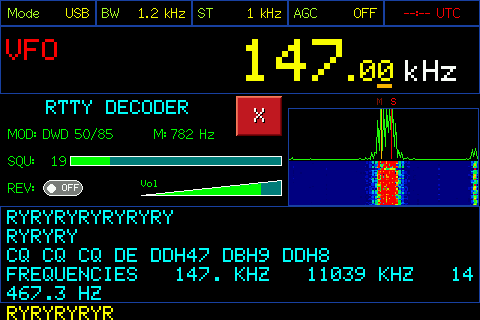
RTTY decoder page
Below is the description of the various components visible on the page.
Header
At the top are the same five boxes as the main page: Mode, BW, ST, AGC and the clock. In the example the radio is USB, with a 1.2 kHz band and 1 kHz step.
Frequency display
Below the heading is the frequency the radio is tuned to, in large letters, with VFO or MEM on the left. By touching the indication you switch from one mode to the other, as on the main page; when switching from MEM to VFO the radio remains on the same frequency.
Decoder title
Below the frequency, on the left, in blue, is the title RTTY DECODER. When you scroll, the decoded text becomes yellow with the word SCROLL, as we will see later.
MOD
MOD indicates the type of RTTY transmission that the decoder is looking for: each choice sets the speed (in baud) and the distance between the two tones (the shift, in Hz), as well as the starting position of the tones. The name indicates speed and shift: in the example "DWD 50/85" means 50 baud and 85 Hz shift. There are six choices available:
- DWD 50/450 — 50 baud, shift 450 Hz, Mark at 1500 Hz.
- DWD 50/85 — 50 baud, shift 85 Hz, Mark at 1500 Hz.
- HAM 45/170 — 45.45 baud, shift 170 Hz, Mark at 2125 Hz.
- HAM LO/170 — 45.45 baud, shift 170 Hz, Mark at 1275 Hz.
- NAV 50/425 — 50 baud, shift 425 Hz, Mark at 2000 Hz.
- MIL 75/850 — 75 baud, shift 850 Hz, Mark at 1500 Hz.
M (Mark frequency)
M is the frequency of the Mark tone, in Hz. The Space tone is located above it, at the shift distance of the chosen transmission type. In the example the Mark is at 782 Hz.
Squelch (SQU)
SQU is the reception threshold, from 0 to 100: to the right of the label there is the numerical value and below a bar that represents it. A higher value causes only the strongest signals to be decoded, a lower one makes the decoder more sensitive but also more exposed to noise.
REV
REV is a switch that reverses the two tones. Used when receiving a "switched tones" signal (for example receiving from the other sideband): if the text appears without meaning, try changing REV.
Volume
To the right of REV is the volume control, labeled Vol.
X button
The red X closes the decoder and takes you back to the Digital Modes menu.
Spectrum and Waterfall
On the right is the spectrum of the received audio, with the waterfall (the color graph with time flowing downwards) underneath. The letters M and S appear above the spectrum, with two vertical lines: they indicate where the decoder is looking for the Mark tone and the Space tone. An RTTY signal appears as two nearby peaks: for the text to be decoded they must fall right on the two M and S lines.
Decoded text
At the bottom is the text area, with six lines visible. The lines that are already complete are in blue; the last one, the one on which the characters are arriving, is in yellow. When a line is filled or a line break occurs, the text scrolls up.
The first time a character arrives after entering the page, or after changing MOD or REV, a header line appears between equal signs with band, frequency, transmission type and REV status: it serves to distinguish different reception sessions.
Tune the tones
For the text to appear, the M and S lines must coincide with the two peaks of the signal. Touch the spectrum: the box turns yellow and the writing M becomes yellow. From that moment you can move the tones in two ways: by rotating the knob, in steps of 5 Hz, or by touching the spectrum at the point where you see the lowest peak (the Mark). In both cases the Space moves together with the Mark, maintaining the shift. Touching any point outside the spectrum turns the box blue again and the tones stay where they are.
Changing the transmission type (MOD)
Tap MOD: it turns yellow. By turning the knob you scroll through the six choices, one at a time; after the last one we return to the first. By touching any point outside MOD the writing turns green. The choice is saved: the radio remembers it even after switching off.
Adjust the squelch
Tap SQU: it turns yellow. By rotating the knob the threshold changes from 0 to 100. By touching any point outside SQU the writing turns green. The chosen value is saved.
Reversing the tones (REV)
Tap the REV switch to turn it on or off. The choice is saved for the active transmission type.
Change frequency
By turning the knob the frequency changes, in steps equal to the value of ST if you are in VFO, or by passing from one memory to another if you are in MEM. By touching the frequency digits, in VFO the numpad opens to directly enter the frequency; in MEM the list of memories opens, to choose one.
Scroll the text
Tap the text area: the title turns yellow with the word SCROLL and the text box turns yellow. By turning the knob you scroll back through the text already received (the radio retains 60 lines). To return to the incoming text, tap anywhere above the text area: the title turns blue and the text starts again from the last line.
Adjust the volume
Tap the volume control: it turns yellow. Rotating the knob raises or lowers the volume.