WSPR
WSPR (Weak Signal Propagation Reporter) is a digital mode designed for observing propagation with very weak signals.
Each transmission lasts about 110.6 seconds and starts in even two-minute UTC slots. A received message can contain the call sign, Maidenhead locator and declared power.
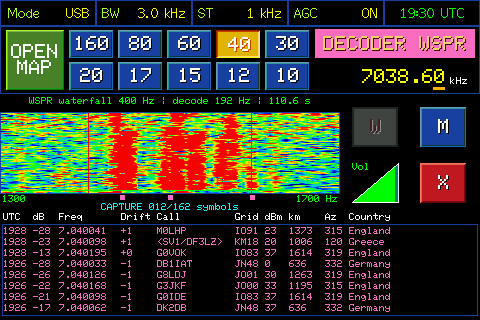
The WSPR decoder receiving and decoding signals
Synchronize the clock
WSPR requires an accurate UTC clock. Before starting, connect the radio to Wi-Fi and use the W button to synchronize the time. With an incorrect clock, the decoder can miss the start of a slot and produce no results.
Choose band and frequency
Select the band in the decoder. The preset USB dial frequencies are: 160 m 1836.60 kHz; 80 m 3568.60 kHz; 60 m 5287.20 kHz; 40 m 7038.60 kHz; 30 m 10138.70 kHz; 20 m 14095.60 kHz; 17 m 18104.60 kHz; 15 m 21094.60 kHz; 12 m 24924.60 kHz; 10 m 28124.60 kHz.
After changing band, you may need to wait for the next slot and then for the whole message, so slightly more than two minutes.
Spectrum and receive window
The spectrum displays the 1300–1700 Hz audio region. The decoder searches a narrower window, about 192 Hz wide and centered near 1500 Hz. Stable, accurate tuning is as important as correct time synchronization.
Decode results
For each valid spot, the radio shows the call sign, locator and declared power; when available it also shows estimated signal-to-noise ratio (SNR) and frequency drift. The WSPR decoder does not calculate DT.
WSPR type 2 or 3 messages may show a compressed call sign in the form <Hxxxx> until enough information is available to reconstruct it.
Map and history
Tap OPEN MAP to open the WSPR map. Decoded signals containing a locator are shown at their corresponding position; lines connect the received stations to your QTH, making it easy to see where the signals are coming from.
The list of received spots remains visible at the bottom. Session history is kept in the radio's memory and does not survive a restart; when full, the oldest results are replaced.
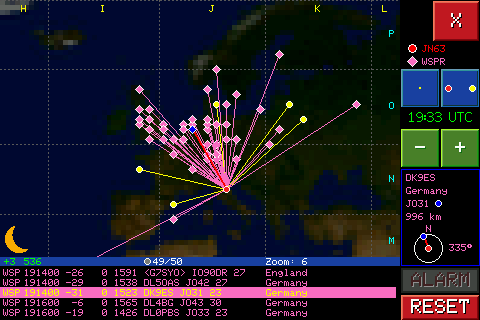
The WSPR map shows where decoded signals come from
Waiting and limitations
Silence for one or more cycles does not necessarily indicate a fault: there may be no receivable beacon on that band. If samples are missing during a frame, the incomplete message is discarded. Check UTC time, frequency, antenna and signal level, then wait for at least a few complete cycles.